
| Feature | ChatGPT Canvas | Claude Artifacts |
|---|---|---|
| Best For | Collaborative Editing | Previewing Docs & Code |
| Real-Time Editing | Yes (Directly in UI) | No (Write-only) |
| UI Vibe | Modern Text Editor | Clean Sidepanel |
| 2026 Status | Fully Integrated | Feature-Rich |
My Hands-on Test: The Quantum Crisis
I started my day with Claude. I asked it to outline a 3,000-word piece. Claude popped open an Artifact on the right side. It looked clean. It looked professional. But then I tried to change a single sentence in the second paragraph. Want to know what happened? I had to ask the AI to “rewrite the whole thing with that one change.” It felt like asking a world-class chef to remake an entire meal because I wanted one more grain of salt. It’s annoying, it consumes your daily limits, and it kills your creative flow.
Then I moved to ChatGPT Canvas. I pasted the same mess in. ChatGPT didn’t just show me the text; it let me click inside and type. I could highlight a section, hit a button, and tell it to “make this sound less like a textbook.” The AI edited the specific part I wanted without nuking the rest of the document. It felt—dare I say it—natural. It was like having a smart intern sitting next to me who actually listens instead of just handing me a finished report and running away. I could fix a typo myself without having to explain it to the machine.
The Feature Fight: A Deep Dive
But wait, don’t count Claude out just yet. There’s a reason people swear by Artifacts. Let’s break down the metrics that actually matter for your workflow in 2026.
| Metric | ChatGPT Canvas | Claude Artifacts |
|---|---|---|
| Real-time editing | Incredible. You can type right in the window. | Non-existent. You have to prompt for every edit. |
| Formatting options | Solid shortcuts for bold, lists, and headers. | Heavy focus on Markdown and Code rendering. |
| Preview speed | Instantaneous updates as you type. | Fast, but requires a fresh generation cycle. |
| Ease of use | Feels like Google Docs. Very low friction. | Feels like a tech tool. Slightly higher learning curve. |
| Logic Depth | Can get slightly generic. | Authoritative and highly logical. |
The “Context Window” Trap
In 2026, we’re all dealing with massive amounts of data. The biggest frustration I found during my test wasn’t just about editing; it was about how much the AI could “remember” in the sidepane. ChatGPT Canvas is great for about 2,000 words. After that, it starts to get “foggy.” It might forget the tone you established in the first paragraph or start repeating itself. It’s like the internal memory of the Canvas has a shorter leash than the chat window itself.
Claude Artifacts, however, is a beast when it comes to long-form consistency. Because it treats each Artifact as a discrete unit of code or text, it seems to maintain a tighter grip on the structural logic. If I have a 5,000-word research summary, Claude won’t lose the plot as easily. But—and this is a big “but”—you’re still stuck in that read-only loop. You find yourself spending more time “managing” the AI than actually writing.
My Honest Frustrations: The Ugly Side
I’m not a fanboy for either of these. Both tools did something that made me want to throw my laptop out the window at least once during my test. Let’s get blunt about the stuff the marketing teams won’t tell you.
What Annoyed Me About ChatGPT Canvas
ChatGPT has this habit of getting “too aggressive” with its edits. Sometimes I’d highlight a sentence and ask for a polish, and it would rewrite the entire paragraph around it with a bunch of fluff I didn’t need. It’s like a barber who decides you need a buzz cut when you only asked for a trim. Plus, the transition between the chat and the canvas can feel clunky if you’re doing 50 things at once. There was one point where it just stopped syncing my manual edits, and I had to refresh the page and pray I didn’t lose my work. Not exactly ‘stable’ for professional use.
What Annoyed Me About Claude Artifacts
Claude is brilliant at logic, but the Artifacts window is basically a “read-only” museum. If I see a typo, I can’t just fix it. I have to tell Claude, “Hey, in the third paragraph, you spelled ‘quantum’ wrong.” Then Claude apologizes (classic Claude) and regenerates the whole thing. In 2026, we shouldn’t have to wait for a full re-gen just for a typo. It makes the workflow feel stuttery. There’s also the issue of “Artifact Fatigue”—where you end up with 20 different versions of the same document in your sidebar and no easy way to merge them. It’s a mess.
2026 Pricing: Who Is Winning Your Wallet?
Let’s talk money. In 2026, the AI market has split. ChatGPT Canvas is bundled into the $20/month Plus plan, but the “Pro” version with higher-rate limits is now creeping toward $30. Claude Artifacts is free, but you hit a “Usage Limit” remarkably fast if you’re constantly asking it to regenerate docs. If you’re a high-volume writer, you will end up paying for both just to keep your workflow moving. It’s a tax on productivity that didn’t exist two years ago.
What really grinds my gears is that these features are increasingly becoming “walled gardens.” You can’t easily export a Canvas directly into a formatted Artifact, or vice versa. They want you stuck in their ecosystem. If you start a project in one, you’re likely staying there until it’s finished, even if the other tool is better for the next phase. It’s a subtle form of platform lock-in that we need to keep an eye on.
How to Use These Tools Like a Pro
If you’re going to use these, do it right. Don’t just treat them like a regular chat box. Here is a quick guide on how I maximized each one during my research crunch.
- For ChatGPT Canvas: Treat it like a collaborative draft. Don’t just prompt; interact with the text. Highlight specific sentences and use the “Polish” button. It saves you from having to explain the context every time. Use manual typing for the small fixes and let the AI handle the structural heavy lifting.
- For Claude Artifacts: Use it for the architectural phase. Let it build the structure, the data tables, and the technical code blocks. It’s better at holding complex structures together without hallucinations. Once you have the meat of the content, move it to a real editor for the final polish.
Pros & Cons: The Dirty Details
- ChatGPT Canvas Pros: Direct editing, fantastic “suggested edits” mode, feels like a real writing app, great for quick iterations.
- ChatGPT Canvas Cons: Can be overly verbose, occasionally loses context on long docs, aggressive rewriting habits.
- Claude Artifacts Pros: Perfect for rendering code/docs, very stable logic, great for Version Control, clean aesthetic.
- Claude Artifacts Cons: Read-only limitation is a massive flow-killer, high usage of tokens for minor edits.
The Final Verdict: Who Wins?
But here’s the kicker: I didn’t end up choosing just one. For the initial research and the data-heavy heavy lifting, I stuck with Claude. It’s just smarter at parsing complex files without making things up. But for the actual drafting, smoothing out sentences, and polishing the final voice, I moved everything into ChatGPT Canvas. If I had to pick one for a pure “writing” task? It’s ChatGPT Canvas by a mile. The ability to click and edit is just too valuable to ignore in a fast-paced work environment.
If you’re a developer or someone who needs to see real-time previews of websites or data dashboards, Claude Artifacts is your best friend. It’s a presentation tool that happens to write. But for the rest of us just trying to get words on a page? Don’t fall for the hype of a “read-only” sidebar. Go where you can actually touch your work and feel like you’re in control of the creative process.
FAQs
Can I use both features for free in 2026?
Most AI platforms in 2026 have restricted these advanced UI features to their paid tiers. You might get a few free runs, but if you’re doing serious professional work, you’ll need the subscription to avoid constant usage caps.
Are these tools better than Google Docs?
For research and AI-assisted drafting? Yes. For final formatting and collaboration with human teams? Not yet. Most of us still end up finishing our work in Google Docs or Word for the final export.
Will my data be used for training if I use Canvas?
Check your settings. If you’re on a Team or Enterprise plan, your data is usually partitioned. On a personal plan? The AI is likely learning from your edits to get better at predicting how the next person writes.
ChatGPT Canvas vs. Claude Artifacts: Which AI Feature is Better for Writing and Editing?Look, I’m going to be blunt: I spent ten hours yesterday trying to finish a complex research piece on quantum encryption. I swapped between ChatGPT’s ‘Canvas’ and Claude’s ‘Artifacts’ like a caffeinated ping-pong ball. Most of what you read online is fluff. I’m here to tell you which one actually makes your life easier and which one is just a fancy gimmick designed to waste your time.
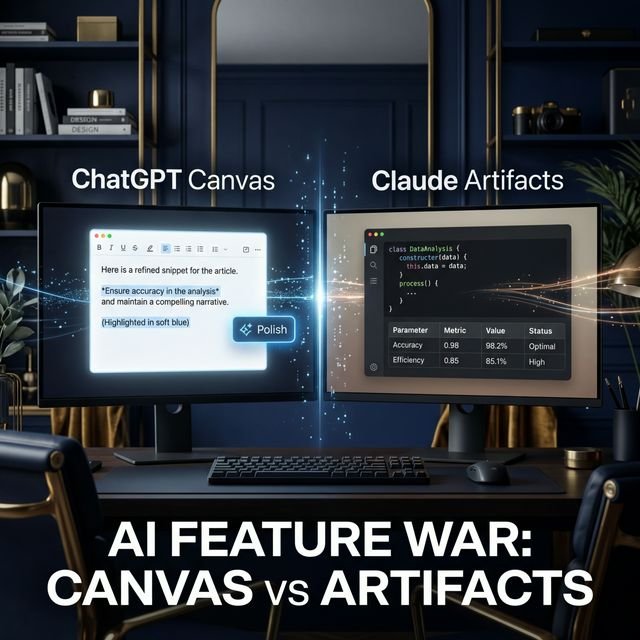
We’ve all been there. You have a massive wall of text, and you’re trying to move paragraphs, fix the tone, or just see if the damn thing makes sense. For the longest time, we were stuck copying and pasting back and forth into Google Docs. Then came the side-by-side revolution. OpenAI gave us Canvas, and Anthropic gave us Artifacts. Both claim to be the ultimate companion for writers. Spoiler alert: they aren’t the same tool, even if they look like cousins. One is a collaborative workspace; the other is a high-end display case.
Quick Overview: The High-Level Battle
| Feature | ChatGPT Canvas | Claude Artifacts |
|---|---|---|
| Best For | Collaborative Editing | Previewing Docs & Code |
| Real-Time Editing | Yes (Directly in UI) | No (Write-only) |
| UI Vibe | Modern Text Editor | Clean Sidepanel |
| 2026 Status | Fully Integrated | Feature-Rich |
My Hands-on Test: The Quantum Crisis
I started my day with Claude. I asked it to outline a 3,000-word piece. Claude popped open an Artifact on the right side. It looked clean. It looked professional. But then I tried to change a single sentence in the second paragraph. Want to know what happened? I had to ask the AI to “rewrite the whole thing with that one change.” It felt like asking a world-class chef to remake an entire meal because I wanted one more grain of salt. It’s annoying, it consumes your daily limits, and it kills your creative flow.
Then I moved to ChatGPT Canvas. I pasted the same mess in. ChatGPT didn’t just show me the text; it let me click inside and type. I could highlight a section, hit a button, and tell it to “make this sound less like a textbook.” The AI edited the specific part I wanted without nuking the rest of the document. It felt—dare I say it—natural. It was like having a smart intern sitting next to me who actually listens instead of just handing me a finished report and running away. I could fix a typo myself without having to explain it to the machine.
The Feature Fight: A Deep Dive
But wait, don’t count Claude out just yet. There’s a reason people swear by Artifacts. Let’s break down the metrics that actually matter for your workflow in 2026.
| Metric | ChatGPT Canvas | Claude Artifacts |
|---|---|---|
| Real-time editing | Incredible. You can type right in the window. | Non-existent. You have to prompt for every edit. |
| Formatting options | Solid shortcuts for bold, lists, and headers. | Heavy focus on Markdown and Code rendering. |
| Preview speed | Instantaneous updates as you type. | Fast, but requires a fresh generation cycle. |
| Ease of use | Feels like Google Docs. Very low friction. | Feels like a tech tool. Slightly higher learning curve. |
| Logic Depth | Can get slightly generic. | Authoritative and highly logical. |
The “Context Window” Trap
In 2026, we’re all dealing with massive amounts of data. The biggest frustration I found during my test wasn’t just about editing; it was about how much the AI could “remember” in the sidepane. ChatGPT Canvas is great for about 2,000 words. After that, it starts to get “foggy.” It might forget the tone you established in the first paragraph or start repeating itself. It’s like the internal memory of the Canvas has a shorter leash than the chat window itself.
Claude Artifacts, however, is a beast when it comes to long-form consistency. Because it treats each Artifact as a discrete unit of code or text, it seems to maintain a tighter grip on the structural logic. If I have a 5,000-word research summary, Claude won’t lose the plot as easily. But—and this is a big “but”—you’re still stuck in that read-only loop. You find yourself spending more time “managing” the AI than actually writing.
My Honest Frustrations: The Ugly Side
I’m not a fanboy for either of these. Both tools did something that made me want to throw my laptop out the window at least once during my test. Let’s get blunt about the stuff the marketing teams won’t tell you.
What Annoyed Me About ChatGPT Canvas
ChatGPT has this habit of getting “too aggressive” with its edits. Sometimes I’d highlight a sentence and ask for a polish, and it would rewrite the entire paragraph around it with a bunch of fluff I didn’t need. It’s like a barber who decides you need a buzz cut when you only asked for a trim. Plus, the transition between the chat and the canvas can feel clunky if you’re doing 50 things at once. There was one point where it just stopped syncing my manual edits, and I had to refresh the page and pray I didn’t lose my work. Not exactly ‘stable’ for professional use.
What Annoyed Me About Claude Artifacts
Claude is brilliant at logic, but the Artifacts window is basically a “read-only” museum. If I see a typo, I can’t just fix it. I have to tell Claude, “Hey, in the third paragraph, you spelled ‘quantum’ wrong.” Then Claude apologizes (classic Claude) and regenerates the whole thing. In 2026, we shouldn’t have to wait for a full re-gen just for a typo. It makes the workflow feel stuttery. There’s also the issue of “Artifact Fatigue”—where you end up with 20 different versions of the same document in your sidebar and no easy way to merge them. It’s a mess.
2026 Pricing: Who Is Winning Your Wallet?
Let’s talk money. In 2026, the AI market has split. ChatGPT Canvas is bundled into the $20/month Plus plan, but the “Pro” version with higher-rate limits is now creeping toward $30. Claude Artifacts is free, but you hit a “Usage Limit” remarkably fast if you’re constantly asking it to regenerate docs. If you’re a high-volume writer, you will end up paying for both just to keep your workflow moving. It’s a tax on productivity that didn’t exist two years ago.
What really grinds my gears is that these features are increasingly becoming “walled gardens.” You can’t easily export a Canvas directly into a formatted Artifact, or vice versa. They want you stuck in their ecosystem. If you start a project in one, you’re likely staying there until it’s finished, even if the other tool is better for the next phase. It’s a subtle form of platform lock-in that we need to keep an eye on.
How to Use These Tools Like a Pro
If you’re going to use these, do it right. Don’t just treat them like a regular chat box. Here is a quick guide on how I maximized each one during my research crunch.
- For ChatGPT Canvas: Treat it like a collaborative draft. Don’t just prompt; interact with the text. Highlight specific sentences and use the “Polish” button. It saves you from having to explain the context every time. Use manual typing for the small fixes and let the AI handle the structural heavy lifting.
- For Claude Artifacts: Use it for the architectural phase. Let it build the structure, the data tables, and the technical code blocks. It’s better at holding complex structures together without hallucinations. Once you have the meat of the content, move it to a real editor for the final polish.
Pros & Cons: The Dirty Details
- ChatGPT Canvas Pros: Direct editing, fantastic “suggested edits” mode, feels like a real writing app, great for quick iterations.
- ChatGPT Canvas Cons: Can be overly verbose, occasionally loses context on long docs, aggressive rewriting habits.
- Claude Artifacts Pros: Perfect for rendering code/docs, very stable logic, great for Version Control, clean aesthetic.
- Claude Artifacts Cons: Read-only limitation is a massive flow-killer, high usage of tokens for minor edits.
The Final Verdict: Who Wins?
But here’s the kicker: I didn’t end up choosing just one. For the initial research and the data-heavy heavy lifting, I stuck with Claude. It’s just smarter at parsing complex files without making things up. But for the actual drafting, smoothing out sentences, and polishing the final voice, I moved everything into ChatGPT Canvas. If I had to pick one for a pure “writing” task? It’s ChatGPT Canvas by a mile. The ability to click and edit is just too valuable to ignore in a fast-paced work environment.
If you’re a developer or someone who needs to see real-time previews of websites or data dashboards, Claude Artifacts is your best friend. It’s a presentation tool that happens to write. But for the rest of us just trying to get words on a page? Don’t fall for the hype of a “read-only” sidebar. Go where you can actually touch your work and feel like you’re in control of the creative process.
FAQs
Can I use both features for free in 2026?
Most AI platforms in 2026 have restricted these advanced UI features to their paid tiers. You might get a few free runs, but if you’re doing serious professional work, you’ll need the subscription to avoid constant usage caps.
Are these tools better than Google Docs?
For research and AI-assisted drafting? Yes. For final formatting and collaboration with human teams? Not yet. Most of us still end up finishing our work in Google Docs or Word for the final export.
Will my data be used for training if I use Canvas?
Check your settings. If you’re on a Team or Enterprise plan, your data is usually partitioned. On a personal plan? The AI is likely learning from your edits to get better at predicting how the next person writes.